Inbox zero method: The complete guide to mastering your email
Master the inbox zero method with our complete guide. Learn Merlin Mann's original framework, proven strategies, and which AI-powered tools can help. Slug: /inbox-zero-method

The inbox zero method has transformed how millions of professionals approach email. But despite its popularity, most people misunderstand what inbox zero actually means, and even more struggle to make it work in practice.
This guide covers everything you need to know: the original philosophy behind inbox zero, the specific techniques that make it work, common mistakes that derail even the most motivated professionals, and how modern AI-powered tools can finally make inbox zero achievable for everyone.
What is the inbox zero method?
The inbox zero method is an email management approach designed to keep your inbox empty, or nearly empty, at all times. The technique involves processing each email as it arrives through a systematic decision framework rather than letting messages accumulate.
Productivity expert Merlin Mann introduced the concept in 2006 on his blog 43 Folders. Contrary to popular belief, the "zero" in inbox zero does not refer to the number of messages in your inbox. Instead, Mann defined it as "the amount of time an employee's brain is in his inbox."
This distinction matters. Inbox zero is not about obsessively clearing every message or achieving some mythical state of email perfection. The goal is to reduce the mental energy you spend thinking about email so you can focus on work that actually matters.
The method gained mainstream attention after Mann delivered a talk at Google in 2007, sparking a movement around systematic email management that continues to influence productivity thinking today.
Why inbox zero matters more than ever
Email volume has reached staggering levels. In 2025, approximately 376.4 billion emails are sent and received globally every day. The average office worker now receives 121 business emails daily and sends about 40.
The cognitive toll of this volume is significant. Research from cloudHQ found that professionals spend between 5 and 15.5 hours each week on email, depending on their role. For knowledge workers, email can consume up to 28% of the workweek. Across a 45-year career, this adds up to nearly 3,000 working days spent on email alone.
Beyond raw time, there is the problem of attention fragmentation. Studies show that 23% of work time is spent just checking messages, with many employees checking their inboxes every few minutes. Each interruption requires time to refocus, compounding the productivity drain.
The inbox-zero method offers a structured approach to this challenge. Rather than treating email as a continuous obligation that demands constant attention, it transforms email processing into a discrete task with clear boundaries.
Ready to reclaim your time? Try Superhuman Mail
Merlin Mann's five articles of faith
Before diving into tactics, it helps to understand the philosophical foundation upon which Mann built his system. He called these his "five articles of faith":
- Some messages are more equal than others. On any given day, only a handful of emails truly matter. Stop treating every message like a precious gift that deserves careful consideration. Most can be handled quickly or ignored entirely.
- Your time is priceless and wildly limited. Few people have time to respond to every email they receive or even read them in detail. Accept that your workload exceeds your available time and guard that time accordingly.
- Less can be so much more. Stop thinking that brief email responses are rude. When it comes to email, economy is key. A one-line reply that answers the question beats a three-paragraph response that makes you look thoughtful but wastes everyone's time.
- Lose the guilt. An overflowing inbox is bad enough. Do not make it worse by beating yourself up about it. Forget the guilt and focus on building better systems.
- Lying to yourself doesn't empty an inbox. Learn to be honest about your true priorities and realistic about time. Develop what Mann calls a "baseline gut check on what you really intend to do about any given message."
These principles reframe email from an endless obligation into something manageable. The tactics that follow only work if you first internalize this mindset shift.
The core inbox zero framework: Processing every email
The heart of inbox zero is a simple decision framework. When you open an email, you must immediately choose one of five actions:
Delete or archive
If the message requires no action and contains no information you will need to reference later, delete it or archive it immediately. Do not leave it sitting in your inbox as visual clutter.
Many professionals resist archiving because they worry about losing information. Modern email search makes this fear unfounded. You can find any archived message in seconds using search, making elaborate folder systems largely unnecessary.
Delegate
Some emails would be better handled by someone else. Forward these immediately to the appropriate person with any necessary context, then archive or delete the original.
Superhuman Mail makes delegation seamless. With Superhuman Mail's Shared Conversations and Team Comments, you can share conversations with colleagues directly, add internal comments to provide context, and track whether messages have been handled.
Respond immediately
If you can answer the email in two minutes or less, do it now. This rule, borrowed from David Allen's Getting Things Done methodology, prevents small tasks from accumulating into an overwhelming backlog.
The two-minute threshold is deliberate. Anything that can be completed faster than organizing and tracking later should be done immediately.
Defer
If a response requires more than two minutes, or you need to complete some task before you can reply, defer the message to a specific time when you will handle it.
This is where many inbox zero attempts fail. Deferring does not mean leaving the email in your inbox to deal with "later." It means scheduling a specific time to address it and removing it from your inbox until then.
Superhuman Mail's Remind Me feature makes this effortless. Set a reminder for any message, and it will reappear at exactly the time you specify, whether that is later today, tomorrow morning, or next week.
Do
If the email requires a task that can be completed quickly, do it now. Then archive or delete the message.
The key insight across all five actions: touch each email only once. Make a decision immediately rather than reading, thinking about it, and leaving it for later. That "later" approach is what creates inbox overwhelm.
How to actually achieve inbox zero in 5 easy steps
Understanding the framework is one thing. Implementing it is another. Here are the specific practices that make inbox zero achievable:
Process email in batches
Checking email continuously throughout the day fragments your attention and makes sustained focus impossible. Instead, process email at scheduled times, perhaps two or three times daily.
Close your email application between these processing sessions. Disable notifications on your phone and computer. The goal is to make email a discrete task rather than a constant background interruption.
Many Superhuman Mail users find that morning and afternoon processing sessions are sufficient for even high-volume roles. The Notification Settings let you customize exactly which messages interrupt you and when.
Use aggressive filtering
Not every email deserves equal attention. Set up filters to automatically sort incoming messages by importance.
- Route newsletters and promotional emails to a separate folder for batch review
- Flag messages where you are the primary recipient differently from those where you are CC'd
- Prioritize emails from specific senders like your manager, key clients, or direct reports
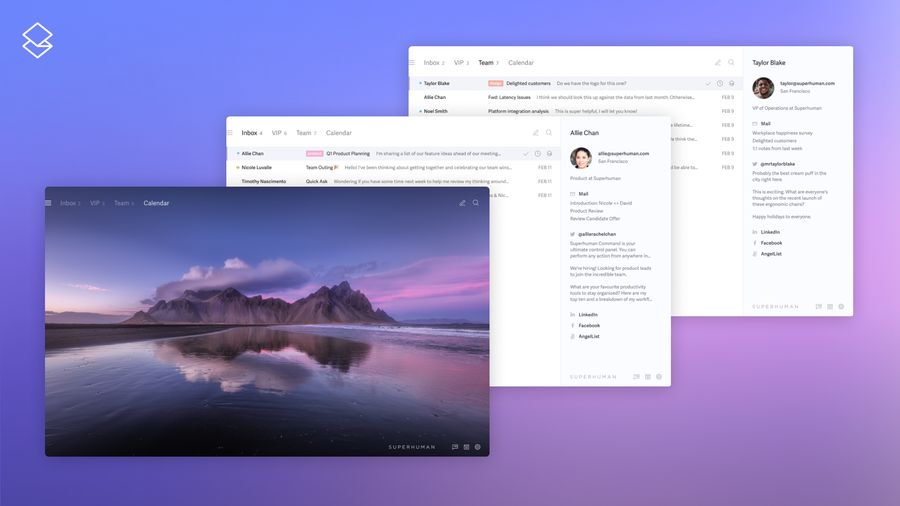
Superhuman Mail's Split Inbox automatically separates your email into streams. See messages from your team in one view, VIP contacts in another, and notifications from tools like Asana or Google Docs in their own dedicated space. You can also use Auto Labels to have AI categorize incoming mail automatically.
Keep your folder structure simple
Elaborate folder hierarchies waste more time than they save. You spend minutes deciding where to file each message, and when you need to find something, you often cannot remember which folder you used.
A simpler approach: archive everything to a single location and rely on search to find what you need. If you must use folders, limit yourself to three or four broad categories at most.
Unsubscribe ruthlessly
A significant portion of inbox clutter comes from subscriptions you signed up for months or years ago and no longer read. Spend fifteen minutes unsubscribing from newsletters and promotional lists that no longer serve you.
Better yet, think twice before subscribing to anything new. Every subscription is a commitment to future inbox volume.
Write shorter emails
The emails you send influence the emails you receive. Long, detailed messages tend to generate long, detailed replies. Questions invite answers. Vague language prompts clarification requests.
Write shorter emails. Be direct about what you need. Use clear subject lines that communicate the message's purpose. The less time others spend parsing your messages, the faster they can respond, and the less back-and-forth clutters both inboxes.
Master your inbox with Superhuman Mail
Common mistakes that sabotage inbox zero
Even with the right framework, several common mistakes can derail your inbox zero practice:
Using your inbox as a to-do list
Your inbox is not designed for task management. Leaving emails unprocessed as reminders to take action creates visual clutter and cognitive overhead. Every time you see those messages, your brain spends energy re-evaluating what they mean and whether you should address them.
Move tasks out of email and into a proper task management system. Then archive the messages.
Checking email first thing in the morning
Many professionals start their day by opening email, immediately surrendering control of their attention to whatever arrived overnight. Someone else's priorities suddenly dictate how you spend your most productive hours.
Consider protecting your morning for focused work. Process email later, after you have made progress on your most important tasks.
Perfecting every response
Some messages warrant careful, thoughtful replies. Most do not. Spending five minutes crafting the perfect response to a simple question wastes time that compounds across dozens of daily messages.
Match your response effort to the email's importance. Quick questions deserve quick answers.
Failing to actually schedule deferred items
Deferring an email only works if you specify when you will address it. Snoozing a message for "later" without committing to a specific time just postpones the decision.
When you defer, pick a concrete time. Block that time on your calendar if necessary.
Zero-obsession
Ironically, obsessing over maintaining inbox zero can create more stress than it relieves. If you check email compulsively to immediately process every new message, you have replaced one problem with another.
The goal is to reduce mental energy spent on email, not achieving some Instagram-worthy screenshot of an empty inbox. It is fine if you reach zero once a week rather than every day.
How AI changes everything about inbox zero
The original inbox zero framework was designed for an era of simpler email tools. Today, AI-powered email clients can automate much of the work that Mann's system required manually.
Superhuman Mail exemplifies this evolution. Superhuman AI can write entire emails from brief instructions while matching your personal tone and style. Auto Summarize instantly distills long threads into key points so you can grasp context in seconds rather than scrolling through dozens of messages.
Instant Reply generates draft responses for common messages, turning the two-minute rule into a 10-second rule for many emails. And AI-powered search lets you find any message instantly with natural language queries, rather than memorizing specific keywords.
These capabilities do not replace the inbox zero framework. They accelerate it. The core principles – processing messages systematically, making quick decisions, avoiding cognitive overhead – remain as relevant as ever. AI simply makes it faster and easier to execute those principles.
Achieving inbox zero with Superhuman Mail
Superhuman Mail was built specifically to make inbox zero achievable. Every feature in the platform, from Split Inbox to AI-powered drafting to keyboard-driven navigation, is designed to help you process email faster while spending less mental energy.
Teams using Superhuman Mail consistently report responding to emails twice as fast and saving four or more hours every week. That is time returned to the work that actually matters.
The platform integrates seamlessly with Gmail and Outlook, so you keep your existing email address and contacts. Onboarding takes just a few minutes.
Try Superhuman Mail and achieve inbox zero