Spark vs Superhuman Mail: Which AI email empowers high-performing professionals?

Compare Spark and Superhuman Mail for busy executives. Discover which AI-native email client delivers the speed, productivity, and team collaboration features you need.

You start your morning with 200 unread emails. By lunch, another 150 have arrived. Important messages from board members get buried beneath newsletters you forgot to unsubscribe from.
You spend hours each day just managing email—time you should be using for decisions, team leadership, and business development.
Superhuman Mail delivers speed-optimized workflows for executives processing high email volumes. Spark emphasizes team collaboration through customizable interfaces and broad integrations.
Your choice extends beyond features. It's about selecting the platform that amplifies your effectiveness while preserving focus for what matters.
Spark vs Superhuman Mail overview
Both platforms promise to solve your email overload problem, but they take fundamentally different approaches. Superhuman Mail optimizes for speed and individual productivity, targeting executives who process hundreds of emails daily and need every interaction to feel instantaneous.
Spark focuses on collaborative flexibility and accessibility, serving teams that need shared inbox management and affordable pricing. Understanding these core philosophies helps you determine which platform aligns with your workflow.
Superhuman Mail overview
Superhuman Mail changes the way you work with email, making it faster, smarter, and far more intentional. Unlike traditional clients, every interaction responds in under 100 milliseconds.
This creates what customers describe as "flow state"—uninterrupted focus that enables rapid decision-making. The platform's AI capabilities don't just assist with writing. They learn your communication patterns, tone, and vocabulary to generate responses that sound authentically yours.
The keyboard-first design means you can archive, reply, schedule, and search without touching your mouse. Split Inbox automatically organizes messages by priority—VIP contacts, team members, external partners—so you process similar emails in batches rather than jumping between contexts.
Read Statuses show when recipients open your emails, enabling perfectly timed follow-ups. Team Comments let you discuss sensitive communications internally without forwarding to Slack.
Part of the broader Superhuman ecosystem, which includes Grammarly for writing assistance and Coda for collaborative documents, Superhuman Mail integrates with tools that power modern teams. The platform targets professionals who view email as a competitive advantage, not just a communication channel.
- Price point: Premium, paid-only starting at $25/month per user per year
- Ideal user: Executives, high-output teams, productivity-obsessed professionals managing 50+ daily emails
- Key features: Lightning-fast interface built on the 100ms rule, AI that learns your voice, keyboard-first workflows, deep CRM integrations
Spark overview
Spark positions itself as an accessible email platform that enhances traditional workflows without requiring wholesale adoption of new interaction patterns. The Smart Inbox categorizes emails into People, Newsletters, and Notifications—reducing manual organization overhead. This visual categorization helps you quickly identify what needs attention versus what can wait.
The platform's +AI suite provides flexible writing assistance with options to rephrase, expand, or adjust tone. You can draft emails from natural language prompts, then refine them with editing tools. Quick Reply suggests contextual responses for common inquiries. The AI Assistant functions across unified inboxes, enabling natural language queries across multiple email accounts.
Spark's Shared Inboxes let teams collectively manage addresses like support@ or sales@ without password sharing. Email Assignment designates specific messages to team members with deadline tracking. Shared Drafts enable real-time collaborative composition for high-stakes communications. The free tier makes it accessible for individuals, while paid plans unlock team features and advanced integrations.
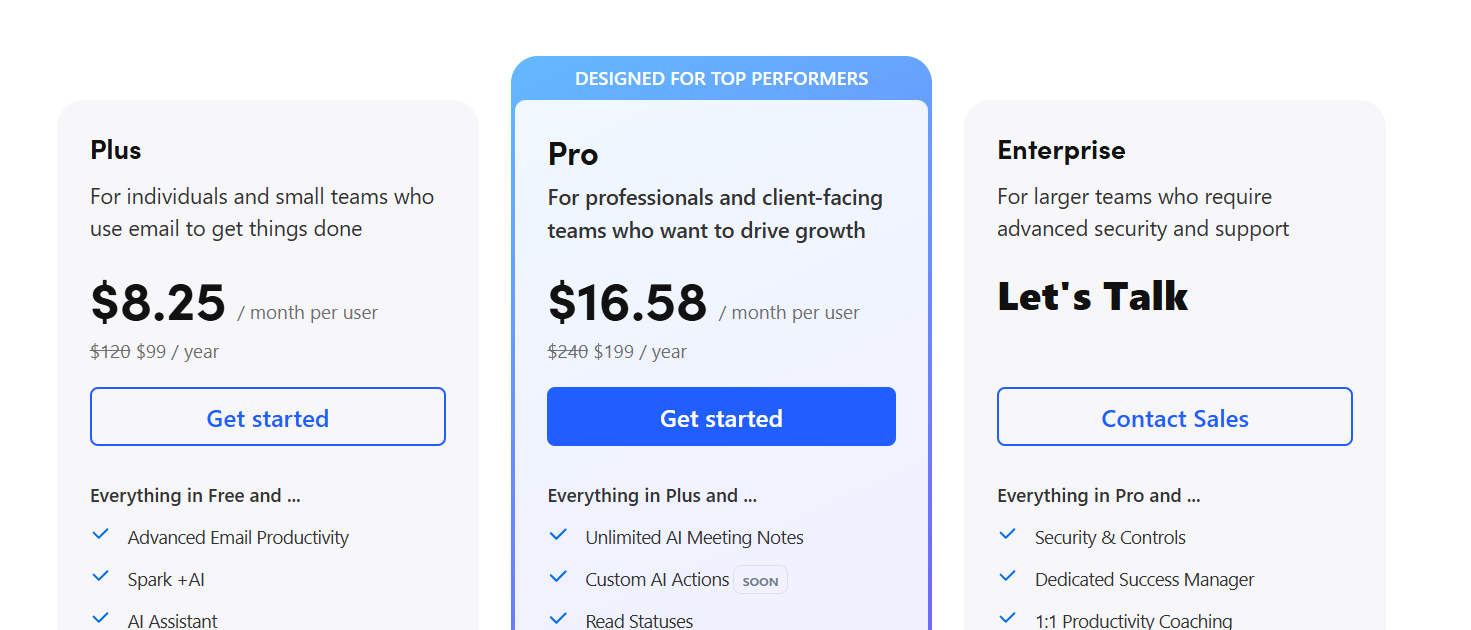
- Price point: Free tier + paid plans from $8.25-$16.58/month per user per annum
- Ideal user: Budget-conscious individuals, collaborative teams, organizations requiring broad platform support
- Key features: Smart Inbox categorization, comprehensive AI writing suite, extensive third-party integrations, team collaboration tools
Spark vs Superhuman Mail vs Spark: Comparison table
AI features: in-depth analysis
The Spark vs Superhuman Mail comparison becomes most pronounced in their AI implementations. Architectural differences create distinct customer experiences and business outcomes.
Superhuman Mail's AI: personalized and context-aware
Superhuman Mail engineers its AI capabilities for executives who need responses that maintain their authentic communication style while processing high email volumes efficiently.
Write with AI leverages your complete email history to generate responses that match your unique voice, tone, and communication patterns. Unlike generic AI tools, this feature analyzes how you communicate with different recipients. It adapts suggestions for board members, customers, and team members accordingly. Customers report that AI-generated responses often require no editing before sending.
Instant Reply provides three complete draft responses for every incoming email. Each represents different approaches or formality levels. This enables rapid response selection without compromising thoughtfulness.
Ask AI transforms your entire email archive into a searchable knowledge base. Questions like "What are the Q4 action items from our board meeting?" or "Where is the investor dinner?" receive immediate answers with direct citations to relevant emails.
Auto Summarize generates one-line summaries above every email conversation. This allows executives to understand complex discussions without reading full threads. For lengthy conversations with multiple stakeholders, this feature extracts key decisions, action items, and next steps.
Auto Labels uses machine learning to categorize emails into action-based groups like "Needs Response," "Waiting On," or "Meetings." The system improves accuracy over time as it learns your priorities.
Spark's AI: flexible and feature-rich
Spark's +AI suite emphasizes user control and comprehensive writing assistance.
+AI Writing Assistant drafts emails from natural language prompts while offering extensive editing capabilities. You can request "Rephrase" for clarity, "Shorten" or "Expand" for length adjustment, and "Tone Adjustment" to shift between formal and casual communication.
Quick Reply provides contextual response suggestions like "Interested," "Not Interested," and "Thanks" for common inquiry types.
+AI Translate enables seamless multilingual communication. The feature supports English, German, Spanish, French, Italian, Japanese, Ukrainian, Russian, and Chinese.
+AI Summary offers customizable summary styles. You can choose Short, Detailed, or Action Point formats based on your immediate needs.
AI Assistant functions as a conversational interface across unified inboxes. It enables natural language queries across multiple email accounts.
The critical difference: personalization vs flexibility
The fundamental distinction in Spark vs Superhuman Mail AI lies in their optimization targets. Superhuman Mail invests heavily in personalization, using more AI tokens per customer to generate responses that authentically replicate individual communication styles.
Customers consistently report that Superhuman's AI-generated content requires minimal editing because it captures their voice so accurately. Similar to how Grammarly learns your writing preferences over time, Superhuman Mail's AI becomes increasingly attuned to your specific communication style.
Spark's approach prioritizes flexibility and user control. The writing assistance functions more as a collaborative tool where you retain complete editorial control rather than receiving ready-to-send responses.
Verdict: For executives who need AI that works as a true extension of their communication style, Superhuman Mail's deep personalization creates measurable time savings. Spark excels for users who prefer guided assistance rather than autonomous generation.
Design and interface
The interface philosophy in Spark vs Superhuman Mail reflects their distinct approaches to professional productivity. These differences have profound implications for daily workflow efficiency.
Superhuman Mail: minimalism meets velocity
Superhuman Mail employs minimalism designed to eliminate cognitive load and maximize processing speed. The interface removes visual clutter, decorative elements, and animations that might interrupt focus. Every design choice serves the primary goal of enabling executives to triage hundreds of emails without mental fatigue.
The keyboard-first architecture ensures virtually every action can be completed without mouse interaction. Archiving, replying, scheduling, and searching all work through keyboard commands. The Command Palette provides universal access to all functions through natural language, teaching keyboard shortcuts organically as you discover new workflows.
Split Inbox allows executives to create focused processing views. Rather than chronologically mixed emails, you can establish separate streams for "VIP" contacts like board members and key customers, "Team" for internal colleagues, "External" for vendors and partners, and "Notifications" for automated systems. This reduces context-switching costs and enables batch processing of similar message types.
The visual design automatically resizes emails for readability across devices, maintains consistent typography and color schemes, and provides instantaneous state changes. When you press 'E' to archive, the email disappears immediately with zero animation delay.
Spark: organized flexibility and visual intelligence
Spark maintains modern interface design superior to Gmail or Outlook while preserving email-familiar navigation patterns. The Smart Inbox automatically categorizes incoming messages into People for real correspondence, Newsletters for marketing content, and Notifications for automated systems. This reduces the cognitive burden of manual organization.
The interface supports multiple viewing modes: Smart Inbox with Unread Cards, Smart Inbox 2.0 with Focused Lists, and Classic Inbox. Split View enables side-by-side browsing for multitasking, while Full-Screen mode provides distraction-free reading.
Color coding distinguishes different email accounts and priority levels, enabling rapid visual parsing. The Gatekeeper feature screens unknown senders and prevents unsolicited messages from cluttering the primary inbox.
The speed differential: 100ms rule vs visual feedback
The most measurable difference in Spark vs Superhuman Mail interfaces is response time. Superhuman Mail targets sub-50ms interactions, adhering to the 100ms rule where anything faster than 100 milliseconds feels instantaneous to human perception. Testing consistently shows Superhuman achieving 10-30ms response times for most actions.
Spark delivers good performance with typical response times of 50-100ms. This remains significantly faster than Gmail or Outlook but creates noticeable lag for customers processing hundreds of daily emails. Spark's subtle animations and visual transitions provide feedback but add latency that compounds across high-volume usage.
Verdict: Spark offers superior flexibility and customization for users who prefer visual organization. Superhuman Mail creates unmatched speed for executives whose productivity depends on rapid email processing.
Speed and productivity: the “4 hour advantage”
The productivity differential between Spark vs Superhuman Mail becomes quantifiable when examining time savings and workflow acceleration across high-volume email users.
Superhuman Mail's measurable impact
Superhuman Mail customers consistently report:
- 4 hours saved per person weekly—equivalent to 5 full workweeks annually
- 12 hours faster response times to critical emails
- 2x email volume processed within the same timeframe
- Inbox Zero achievement in minutes rather than hours
These improvements stem from architectural optimizations designed specifically for executive workflows.
Keyboard Shortcuts enable complete email management without mouse interaction. Essential shortcuts like E for archive, H for snooze, and R for reply become muscle memory within weeks. The Command Palette provides fallback access to any function through natural language.
Natural Language Snoozing allows executives to defer emails with prompts like "next Wednesday at 9 AM in Australia." The system handles timezone conversion automatically. Traditional email clients require multiple clicks and manual timezone calculations.
Auto Archive automatically removes low-priority email categories from the primary inbox. Marketing emails, newsletters, and system notifications disappear from view while remaining searchable if needed.
Workflow acceleration through intelligent automation
Superhuman Mail reduces the friction associated with high-volume email processing.
Smart Send enables email scheduling for optimal delivery times based on recipient patterns. Rather than manually timing communications, the system optimizes send times to maximize open and response rates.
Follow-Up Reminders automatically surface emails that require action. This prevents important communications from disappearing into busy inboxes. The system tracks response expectations and resurfaces messages when attention is due.
Recent Opens provides visibility into when recipients engage with sent messages. This informs follow-up timing and strategy.
Spark's productivity enhancements
Spark users report 30-45 minutes daily time savings through AI-assisted composition reducing writing time, Smart Inbox categorization eliminating manual email sorting, Unified Inbox managing multiple accounts in one interface, and template systems standardizing common responses.
While meaningful, these improvements represent incremental enhancements to traditional email workflows rather than fundamental transformation.
The compound effect for executive teams
For executive teams, the productivity differential between Spark vs Superhuman Mail compounds across organizational scale. A 10-person executive team using Superhuman Mail collectively recovers 40 hours weekly—equivalent to hiring an additional full-time executive assistant.
Verdict: Superhuman Mail delivers transformational productivity gains for high-volume email users. Spark provides solid improvements for moderate email volumes but cannot match the speed optimization that drives Superhuman Mail's measurable outcomes.
Collaboration and integrations
The team coordination capabilities in Spark vs Superhuman Mail reflect their different assumptions about how high-performing professionals work together and integrate email into broader business processes.
Superhuman Mail: real-time team coordination
Superhuman Mail's collaboration features emphasize speed and visibility for distributed teams managing critical communications.
Shared Conversations enable teams to collaborate on external emails without creating separate communication threads. Team members can @mention colleagues to bring them into discussions with all context preserved in one interface.
Crucially, external recipients never see internal team comments. This enables authentic strategy discussions. Similar to how teams use Coda to collaborate on documents in real-time, Shared Conversations keep email collaboration seamless and contextual.
Team Comments allow internal deliberation about customer communications, partnership negotiations, or complex issues directly within the email thread. This eliminates the need to forward emails to Slack or create separate discussion channels.
Team Read Statuses show when team members and external recipients have opened emails. This provides transparency about information flow and enables perfectly-timed follow-ups. When an important prospect opens a proposal but doesn't respond within expected timeframes, the entire team has accurate information about communication status.
Team Reply Indicators prevent duplicate responses by showing when colleagues are actively composing replies to shared emails. This coordination feature eliminates the embarrassing scenario of multiple team members independently responding to the same critical message.
Team Snippets enable sharing of proven email templates across organizations. This scales best practices without requiring training sessions. When a successful sales message or customer service response demonstrates effectiveness, teams can share it immediately organization-wide.
Deep CRM integration for revenue teams
Superhuman Mail's CRM integrations with HubSpot, Salesforce, and Pipedrive bring customer context directly into the email interface. Sales professionals report saving 3-4 minutes per customer email by accessing deal information, interaction history, and next steps without context-switching to separate applications.
The integration displays customer data in the sidebar while composing emails. This enables informed responses without the productivity loss associated with application switching. For sales teams managing 50+ daily customer emails, this integration delivers hours of daily time recovery.
Spark: comprehensive team platform
Spark's collaboration approach centers on Shared Inboxes. These enable teams to collectively manage email addresses like support@, sales@, or info@company.com. Multiple team members access shared accounts through Spark's permission system without password sharing. This solves security vulnerabilities inherent in traditional approaches.
Email Assignment allows team members to designate specific emails to colleagues with context notes and deadline setting. This transforms shared email management from chaotic first-served processing into organized workflows where every email has clear ownership.
Shared Drafts enable real-time collaborative composition where multiple team members simultaneously contribute to email drafts. For high-stakes communications requiring multiple perspectives—client proposals, partnership agreements, and customer escalations—this feature ensures quality without sacrificing speed.
Team Comments facilitate private discussions about external emails. This allows strategy coordination without cluttering customer-facing communications.
Integration ecosystem: depth vs breadth
The integration philosophy in Spark vs Superhuman Mail reflects their architectural differences.
Superhuman Mail pursues selective, deep integrations with business-critical systems. The CRM integrations feel like native features rather than external connections.
This focused approach optimizes for the specific workflows that drive revenue and customer relationships. When you need to polish writing before sending, Grammarly integration provides real-time suggestions without leaving your email interface.
Spark offers integrations with over 20 productivity tools including Asana, Trello, Notion, Evernote, Google Drive, Dropbox, and Slack. This breadth accommodates diverse organizational tool preferences without forcing standardization on specific platforms.
Collaboration impact on executive teams
For executive teams managing complex stakeholder communications, the collaboration differences between Spark vs Superhuman Mail create distinct advantages.
Superhuman Mail excels when executives need rapid coordination on time-sensitive communications. The real-time visibility into team activity combined with seamless internal discussion capabilities enables executive teams to respond quickly to opportunities or issues without sacrificing thoughtfulness.
Spark excels when teams require structured workflows for managing shared responsibilities over longer timeframes. The assignment capabilities and deadline tracking create accountability systems that work well for distributed teams managing routine communications.
Verdict: Superhuman Mail delivers superior collaboration for executive teams requiring speed and real-time coordination. Spark provides better structured collaboration for teams managing routine shared responsibilities across longer timeframes.
Choosing the best tool for executive impact
The choice between Spark vs Superhuman Mail ultimately depends on your professional context, productivity priorities, and return-on-investment calculations.
Choose Superhuman Mail if you:
- Value transformational productivity gains: Saving 4 hours weekly represents 200 hours annually—five full workweeks of recovered focus for strategic work, stakeholder relationships, and high-leverage decision-making.
- Manage high email volumes: Processing 50+ daily emails makes Superhuman Mail's speed optimization and AI personalization particularly valuable. The productivity improvements compound across volume and create measurable competitive advantages.
- Lead revenue-critical communications: Sales teams, business development professionals, and customer-facing executives benefit dramatically from CRM integration, read status visibility, and AI-powered response generation that maintains authentic communication at scale.
- Prioritize speed over cost: A $30–40 monthly investment is negligible compared to the value of time recovered by executives and teams whose effective hourly rates exceed $150. Even small weekly efficiency gains translate into substantial organizational ROI. Superhuman Mail ensures high-value employees operate at peak productivity.
- Work in high-velocity team environments: Distributed teams managing critical communications benefit from real-time coordination features that prevent duplicate work and enable rapid response to opportunities or issues.
Choose Spark if you:
- Need accessible pricing for larger teams: The free tier and $8-17 monthly paid plans make Spark viable for organizations requiring email optimization across many users without substantial technology budget increases.
- Require broad platform flexibility: Teams using diverse productivity tools benefit from Spark's 20+ integrations. This accommodates existing workflows rather than requiring tool standardization.
- Prioritize structured team collaboration: Organizations managing shared inboxes, customer support, or distributed customer communications benefit from Spark's assignment workflows and deadline tracking.
- Prefer gradual workflow adoption: Spark's familiar interface patterns and optional keyboard shortcuts enable incremental productivity improvements without requiring wholesale workflow changes.
- Support international team communications: Spark's translation capabilities and multilingual support serve global organizations better than Superhuman Mail's English-focused optimization.
Spark vs Superhuman Mail: Final verdict
Superhuman Mail emerges as the clear choice for executives and high-performing professionals who recognize email as a strategic productivity lever. The platform delivers measurable, transformational improvements. Teams save 4 hours weekly, process email 2x faster, and respond 12 hours faster. These gains compound into substantial competitive advantages.
While Spark provides solid improvements at accessible pricing, it cannot match the speed optimization, AI personalization, and executive-focused workflow design that make Superhuman Mail the most productive email experience ever created.
For leaders who view productivity tools as strategic investments rather than operational expenses, Superhuman Mail transforms the daily email burden into a professional superpower. It enables the focus and responsiveness that drive organizational success in competitive markets.
Ready to experience the Superhuman Mail advantage? Get Superhuman Mail