The Making of Superhuman Docs: Building the Foundation for Your Most Important Data

As we evolved Coda into Superhuman Docs, we knew that the data layer was one of the first things we wanted to transform and one of the most ambitious. Coda makers had spent years pushing tables and databases further than we could have ever anticipated—and in doing so, showed exactly where the product needed to go.
Nathan Penner, Product Management Director for Docs, came to this project with nearly nine years of customer insights—first at Coda, now at Superhuman—and translated what he’d observed into a clear conviction about what needed to be built. Jason Tamulonis, Director of Engineering for the Docs platform, with over a decade of experience at Coda and Superhuman, built the architecture to match it. Together, they led the development of Superhuman Databases (beta), a new dedicated home for your data within Docs.
We sat down with both of them to discuss what rebuilding the data layer requires, what it unlocks for teams today, and where it’s headed.
Coda users have always found ways to push tables and databases further than almost any other tool allows. How did that inform what you set out to build with Superhuman Docs and Databases?
Nathan Penner: Teams were building things in Coda we never anticipated—complex operations, massive datasets, data shared across entire organizations. The product value was clear, but so were the limits. For some customers, the limitations were around scale; they wanted to work with larger datasets than the product was designed to handle. For others, performance—doc load times, calculation speed, doc size—was becoming a real burden.
Coda was built so that opening a doc meant loading everything in it at once—every table, all at the same time. We made this intentional choice to keep Coda responsive, but it also meant that docs with a lot of data would slow down or hit a ceiling. There was just too much information to manage in a browser tab. That told us people needed something fundamentally different: a purpose-built home for their data where they could manage it directly, set permissions, and connect it across their workspace efficiently.
How did those user signals translate into what needed to be rebuilt at the architectural level?
Jason Tamulonis: We spent a lot of time optimizing how to fit large amounts of structured data into the browser. Because Coda was document-centric, everything had to work locally, even offline, but there’s only so much you can optimize when customers are adding more and more data year after year. So we stepped back and asked a more fundamental question: What does the product look like in the next 10 years, and how does it scale? At its core, it’s a set of incredibly powerful building blocks, many of which are valuable on their own, not just as part of a document.
That realization pointed us toward a different model. Instead of syncing and copying data between documents, you have a central source of truth that different docs connect to. It’s a shift to give data the dedicated home it deserves, while making it usable in docs. With the new architecture, each doc loads only the data it’s actually working with, so the surface you’re on stays fast no matter how large your dataset grows.
Superhuman Databases gives your data a dedicated home that connects across your whole workspace. What does that mean for how someone actually uses it?
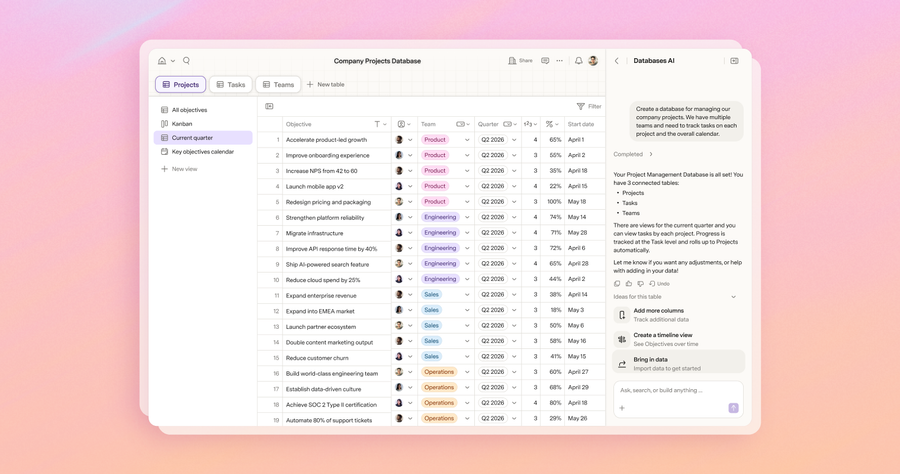
NP: The most immediate thing you’ll notice is that Databases is a new companion product to Docs. Instead of creating a doc and putting a table inside it, you start data-first. You go to Databases, create your tables, and organize them all together. Now you get a data-first interface for managing that data, whether you just want to work with a focused dataset or you’re creating something you intend to reuse across your workspace.
And when you connect that data to a doc, updates are live in real time, in both directions—no more syncing needed. As Jason mentioned above, one database can connect to many docs, so your org-wide project tracking or product roadmap lives in one place and flows into every doc that needs it.
Coda’s flexibility—formulas, views, relations—had to come with you through all of this. How did you think about preserving that while rebuilding the foundation?
JT: It takes a lot of commitment to rebuild something this significant. We had over a hundred major features that needed to be thoughtfully rebuilt or adjusted—not necessarily from scratch, but in a way that leverages everything we’ve learned about how people actually use Coda. The flexibility is what makes this product so valuable: the richness of its formula language and the ability to integrate and reuse data in expressive ways. We wanted to preserve as much of that as possible.
There are a small number of things—canvas columns and some more advanced formula patterns—that we’re approaching differently to make sure the architecture can scale. But that list is very small, and I’m proud of that. The goal has always been to minimize the trade-offs a customer has to make, while still creating a product that is thoughtfully integrated within the larger Superhuman suite and has room to grow.
Docs introduces data permissions that are separate from doc permissions. Why does that separation matter?
NP: It solves a problem that we were seeing constantly. When you give someone editor permissions in a doc today, it’s hard to be precise about what exactly you want them to be able to do.
In a database, we’ve drawn a clear line between editing data and editing schema. You can say: This set of people can add rows and edit values, and this other set of people has full control, including changing columns. That distinction matters enormously when many people are collaborating on the same data. The accidental deletion of a column, the accidental reconfiguration that breaks something—those are real, painful moments that we want to prevent for teams.
JT: The permission model is just the beginning. We also plan to introduce a granular trash can, so if someone deletes a column or a row, you’ll be able to restore it individually, row by row, column by column. The goal is to make Databases a genuinely safer place to operate at scale, because when your most important data lives there, the stakes are higher and the tools must match that.
We think of Databases as the foundation for how teams and AI work together in Superhuman. What does that future look like from where you’re sitting?
NP: We know your data is important. It deserves its own home, and that home needs to work not just for the people on your team, but for the AI working alongside them too. Databases will power AI views, so the interfaces people build on top of their data are always pulling from a current source.
As we bring Superhuman Go deeper into the platform—and open that same access to any AI tool through MCP—agents will be able to read, write, and enhance that data in real time. That’s the vision: your most important data, accessible to everyone who needs it—human or AI. Databases aren’t a standalone product. They’re the foundation everything else runs on.
JT: What we’ve built is a platform, not just a product. A central, scalable, permissioned data layer that every surface in Superhuman can connect to—Docs, AI views, and soon agents on Go. That’s what makes the vision Nathan is describing actually possible. We’re not just storing data; we’re making it accessible, collaborative, and secure across everything your team works in. We’re at the beginning of what this foundation enables, and that’s the part I’m most excited about.