Introducing: Email Assistant by Superhuman Mail

When we started Superhuman Mail, we set out to build the most productive email experience ever made.
There are 1 billion professionals in the world, and on average we spend 3 hours a day reading and writing email. That’s 3 billion hours every single day, or more than 1 trillion hours every single year. In fact, we all spend more time in email than any other work app.
For the past decade, we’ve been working on the Superhuman Mail app. And it is remarkably effective: our customers get through their inbox twice as fast as before, respond 1-2 days faster, and save 4+ hours every single week. We are now saving teams over 25 million hours every year. See the customer love for yourself!
We also learned a lot about the people who are not yet customers. Many professionals don’t have the time or energy to learn a new email app, even if they spend hours a day in email. They simply want to stay in the inbox they already use. But until recently, we couldn’t bring the Superhuman magic to your existing email app.
With agentic AI, this all changes.
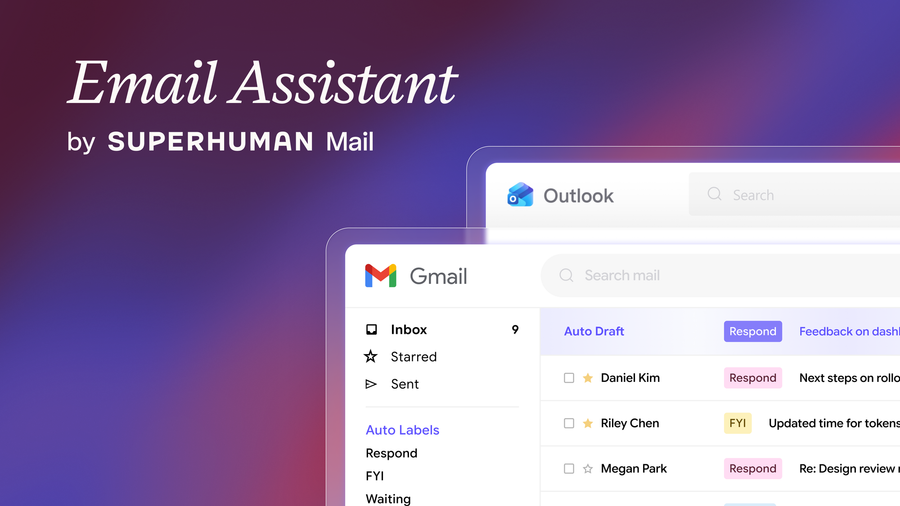
I am thrilled to announce Email Assistant by Superhuman Mail. It brings the best of Superhuman Mail directly into Gmail and Outlook:
Gmail and Outlook, finally under control
In Gmail and Outlook, email can feel futile.
You endlessly sort messages and sift through the noise, trying to track important conversations… and yet you still end up with an overflowing inbox, worried that you’re missing something important or blocking your team.
Gemini and Copilot can offer some help when you ask. But if you have to ask, it’s still you doing the work.
Email Assistant stays on top of your inbox, so you don’t have to. It separates what needs a reply from what is just FYI. It drafts replies for you, so you can respond faster. It resurfaces important conversations, so you never forget to follow up. And it archives low-priority emails, so your inbox is always calm, clean, and focused.
The more an assistant does for you, the more it should earn your trust. We built Email Assistant to be helpful and easy to trust. It never deletes anything, and it doesn’t send email without your permission.
An assistant that doesn’t wait to be asked
To get going, simply connect your existing Gmail or Outlook account. Email Assistant then starts working in the background, right inside Gmail or Outlook. No complex setup, no new app, and no prompting.
Auto Labels organizes emails as they arrive, so you can immediately see what needs attention. It highlights emails that need a reply, separates FYIs, and tracks conversations where you're waiting to hear back.
Auto Drafts writes drafts that are ready to send, so you can respond faster to what matters. Every draft matches your own voice and tone, using your unique style for each person. The drafts can also use context from other emails, insert availability for you and your team, and conduct research online. As your schedule changes, we even keep the drafts up to date, so they are always ready to send.
Auto Reminders resurfaces conversations where you don’t get a reply, so you can follow up on time, every time. These conversations come back with an Auto Draft, so all you have to is hit send.
Auto Archive clears clutter from your inbox, so it remains calm, clean, and focused. Cold pitches, marketing, notifications, and noise skip your inbox entirely. You get a daily recap of what was archived, and you can always find these emails with search or in the Auto Archive folder.
You can control how Email Assistant writes, schedules, and triages with settings for Personalization, Auto Drafts, Auto Archive, and Auto Reminders.
To see a full feature demo, check out this video series.
To get Email Assistant for your whole team, please contact sales.
What early customers are saying
Early customers are on top of their email for the first time in years:
“Auto Drafts is honestly one of the best AI features I've used, even better than Gemini. The replies actually sound like me, and having a draft ready to go saves me so much time. It's one of those features that makes me wonder how I managed my inbox without it.”
“I’ve spent years building systems to organize my inbox, track what I’m waiting on, and remember when to follow up. Email Assistant does so much of that automatically for me… I love that it’s quietly helping me stay organized in the background.”
“I run two businesses and also do work as a fractional COO, so I’m managing multiple inboxes at once. Email Assistant filters all of them for me, and it’s made a real difference—I get through email faster without it taking over my day.”
For our average customer, Auto Archive clears half their inbox. Auto Labels highlights the 4% of emails that actually need a response. Almost half of all Auto Drafts are sent without any edits. And every Auto Draft sent saves on average 9 minutes. If you reply to just 4 emails a day, that’s 3 hours back every week!
Your inbox handled, wherever you work
We have also been accelerating our work to build Superhuman Mail and the Superhuman Mail MCP. Right now, we are reimagining how you see your inbox, connect all your tools, and collaborate with your team. Stay tuned for more!
Email Assistant brings the Superhuman magic to everybody, right inside the inbox you already use. If you want help with your inbox—and you want to stay in Gmail or Outlook—check it out!
We can’t wait to hear what you think.
Onwards 🚀
Rahul