How We Built Superhuman Go to Work Across Platforms
By Oleksii Levzhynskyi, Area Tech Lead, Clients at Superhuman
In 2025, when we changed the name of our company from Grammarly to Superhuman, our mission expanded from building an AI partner that helps you write to creating a team of agents that work seamlessly across every platform to help you work better.
That shift is best encapsulated by our launch of Superhuman Go, an AI assistant that works across your apps and tabs, understands context, and jumps in to help at the right moment. Go uses a team of specialized agents, each designed to handle different tasks and workflows (e.g., a calendar-scheduling agent for booking meetings or a proofreading agent for reviewing writing). We launched the first version of Go in October 2025 as a Chrome extension and have since expanded to Edge, Mac, and Windows.
However, building Go across all those platforms isn’t straightforward. None of these platforms share a common technology (each has its own runtime, native APIs, and execution models), so we have to manage multiple execution contexts and threads to complete a task. Naively rebuilding every agent for each platform would be a maintenance nightmare and slow down our ability to ship new agents. The only viable path was to write each agent once and run it everywhere, but doing that cleanly required getting the architecture right from the start.
In this blog post, we’ll take you through the journey of building Superhuman Go—from a single-surface prototype to a cross-platform app—and share the architecture that lets us write each agent once and run it everywhere.
The first version of Go
We didn’t start by building Go across every platform at once. Instead, we wanted to first validate the core product hypothesis: Would users find value in an AI assistant that coordinates a team of specialized agents, rather than the single writing-focused experience they knew with Grammarly? Since it was a meaningful product bet, we wanted to test it before committing to a full cross-platform build.
With this in mind, we created a stripped-down version of Go in Grammarly’s writing surface, docs. We introduced a team of Grammarly writing agents (e.g., Proofreader, Paraphraser, and Citation Finder) via a side panel, allowing users to get contextual help with their writing. Users would see agent suggestions directly in the document, resembling familiar Grammarly-style underlines. But they could also interact with an AI chat to ask follow-up questions and further refine the suggestions.
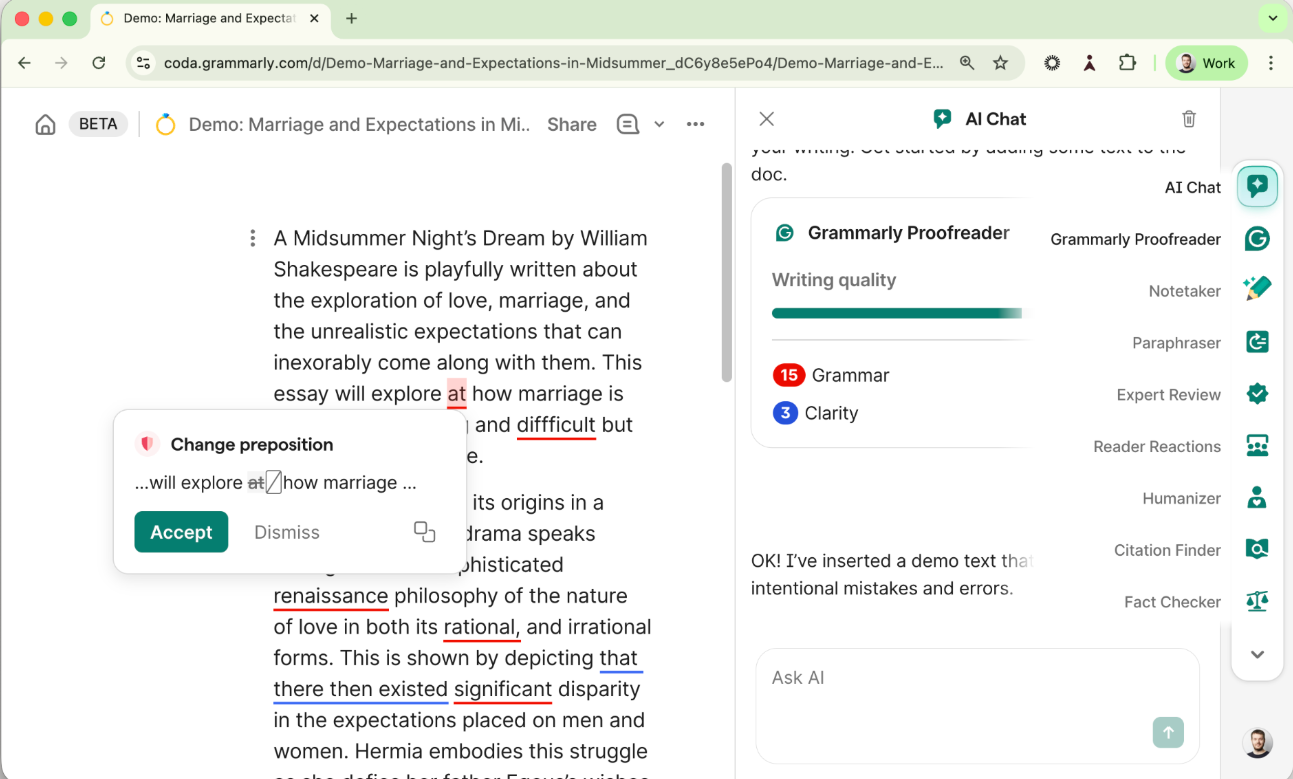
The conversational editing experience inside Coda.
Since docs is a surface we control, everything runs in a single-threaded application, including the UI, text APIs, and back-end requests. We built the product directly into the existing Grammarly codebase, allowing us to ship quickly. Initial results from the prototype were positive, proving our technical and product approach and allowing us to roll it out to all existing docs users.
Building the Superhuman Go for Chrome extension
With the core idea validated, we turned our attention to the first real platform: the Superhuman Go Chrome extension. Unlike the docs experience, this would let users call on Go across any tab—with agents ranging from first-party writing assistants like Grammarly’s writing agents to third-party integrations like a scheduling assistant that connects to your Google or Outlook calendar. We decided that the Go UI would live in a persistent side panel, staying available and capturing context as users work across their browser. Writing corrections still appear as familiar Grammarly-style underlines and in-line cards, allowing users to see Go’s suggestions directly on the page.
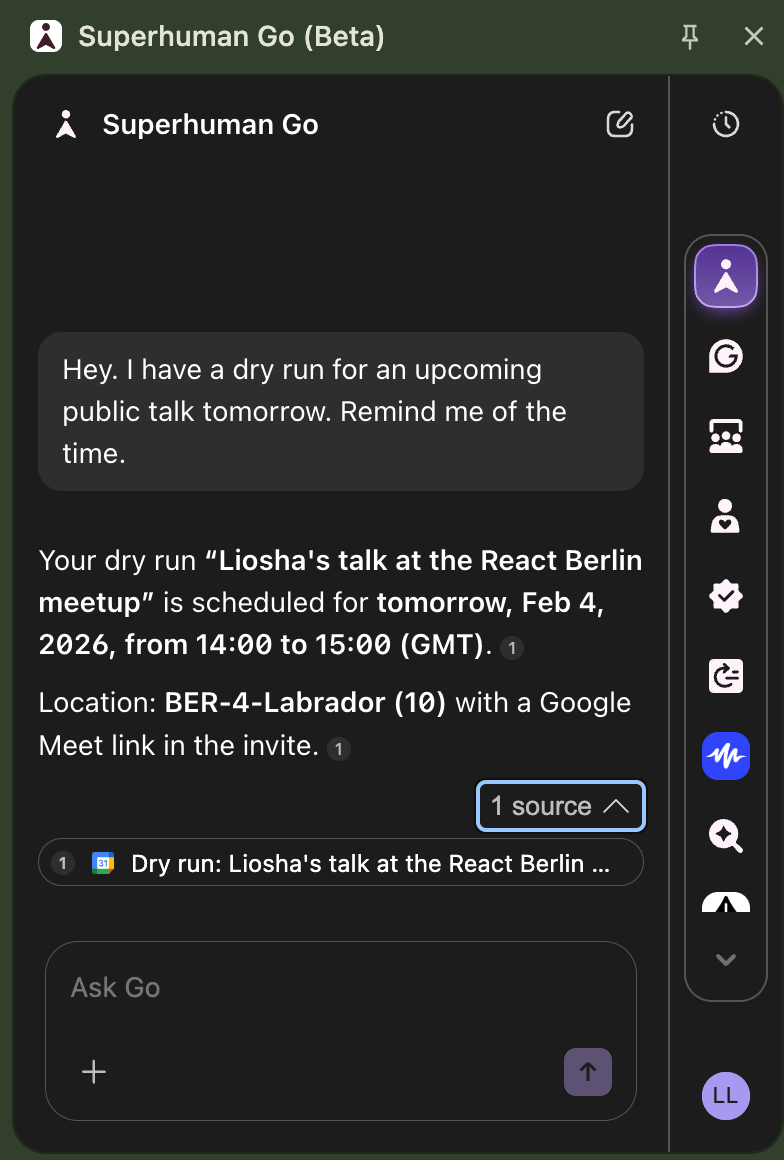
Example of the Superhuman Go for Chrome extension in action.
The UX looks straightforward, but the implementation isn’t. Unlike the docs experience—where everything ran in a single thread—the Chrome extension has to operate across every tab a user opens, with no shared runtime among them. As a result, completing any single task requires coordinating three separate threads:
- Content script: To manipulate the page’s DOM (e.g., add underlines for edit suggestions), we need to use a content script that runs in the isolated context of the active tab. This sandboxed environment ensures that extensions can interact with a page’s DOM without exposing the page or the extension to potentially unsafe JavaScript execution.
- Side panel: This is the home of the Superhuman Go UI, where users can view the agent’s suggestions and chat with Go to refine them. It runs as a separate web page with its own isolated context and no direct access to the active tab’s DOM.
- Service worker: A centralized background layer that connects the content script and side panel together. It’s responsible for tracking application state, making API requests, and coordinating communication between tabs and the side panel.
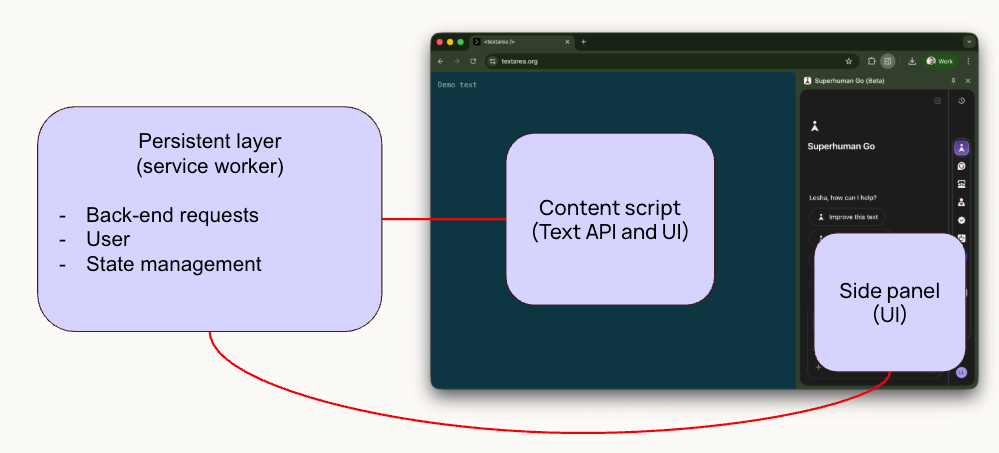
A breakdown of the three threads that we needed to manage to execute a single task in the Superhuman Go for Chrome extension.
To unify these threads, we built a message bus, a communication layer that lets agents interact with the system as if they were running in a single environment. This separation allows the agent code to focus purely on business logic, while the bus handles coordination among the various threads under the hood. The biggest benefit is portability—we can reuse our agent definition as we expand platforms, so we can write once and run everywhere. Each platform still needs to implement the bus itself, but that’s far easier to maintain than implementing the same agent logic separately for Chrome, macOS, and Windows.
This separation also keeps agent code clean and focused. Without the bus, agent definitions get tangled with platform-specific wiring—thread management, message routing, context switching—which can make code hard to read and maintain. With this abstraction, engineers can strictly focus on business logic and let the bus handle the rest. The example below illustrates the difference.
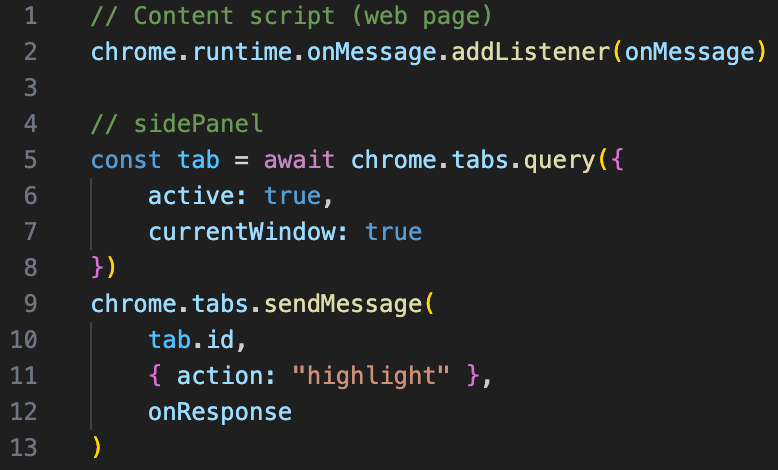
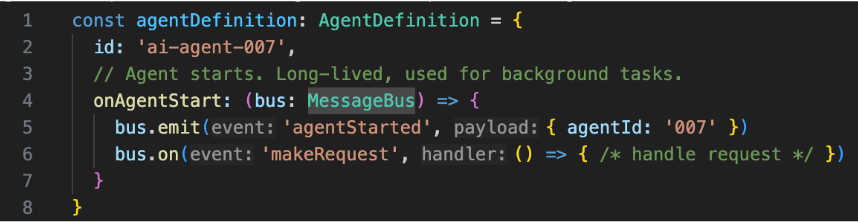
At the top: An implementation for instantiating a new agent, written with all the Chrome-specific wiring. On the bottom: We use the bus to implement the same task, but focus strictly on the core agent logic.
To see the bus in action, let’s see how we can use the bus to create a proofreader agent. Once the content script detects that a user has typed text, it uses the bus to send a request to the service worker containing that text. The service worker analyzes the text, generates the suggestions, and responds to the content script and side panel with suggested edits. The content script shows suggestions as underlines on the page, while the side panel helps users understand and refine them.
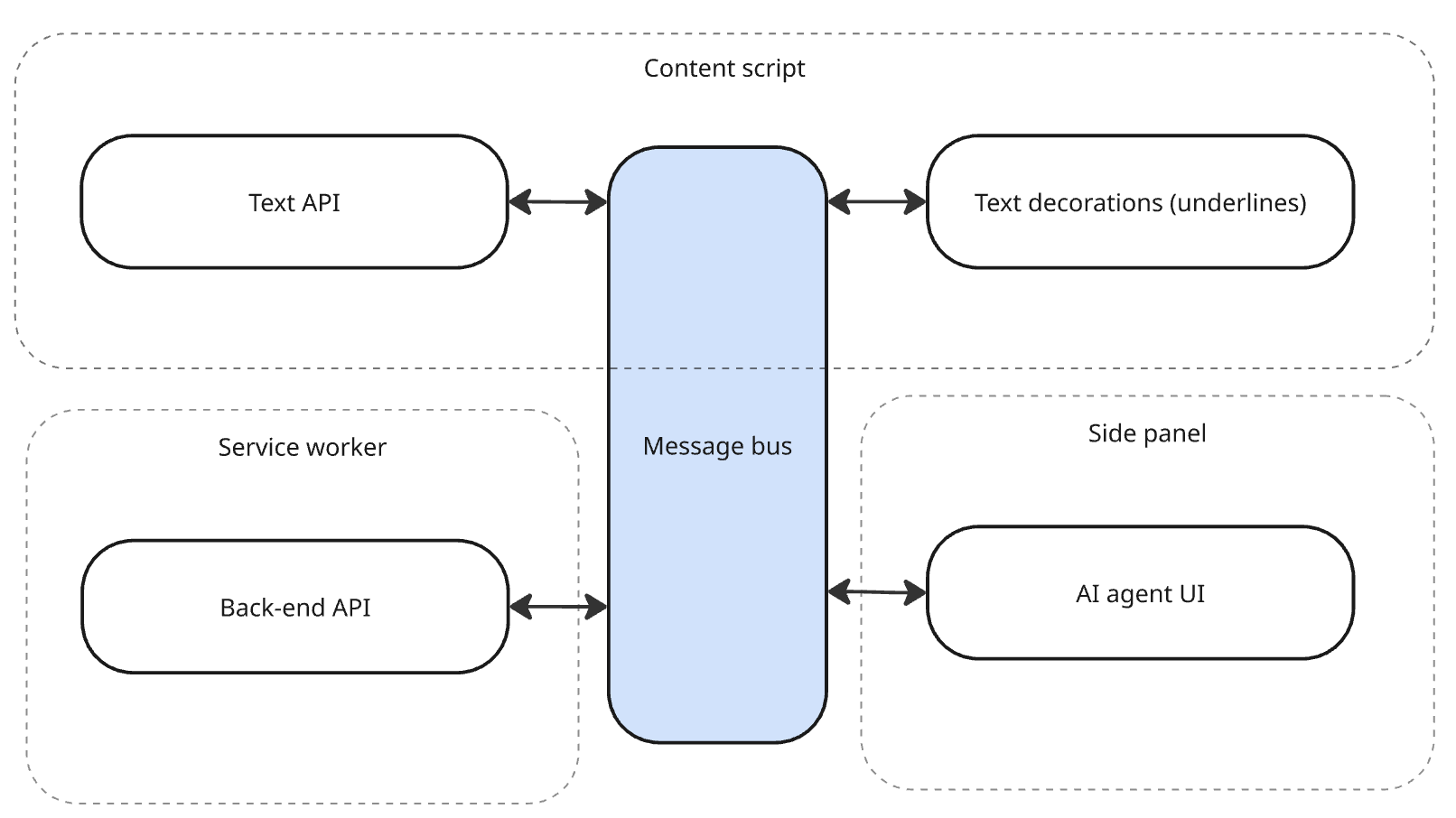
A diagram showing the message bus in action, coordinating across all three layers to provide users with proofreading suggestions.
Extending Superhuman Go to native clients
With the Superhuman Go for Chrome extension launched in beta in October 2025, we turned our attention to a significantly more complex environment: native desktop clients on macOS and Windows.
Unlike Superhuman Go for Chrome, where we had to manage only three threads to complete a task, native clients require us to manage multiple threads for the same task. This is because the native UI is composed of multiple independent elements—in-line cards, side panels, contextual overlays—each rendered as its own view. Even a simple interaction (like clicking into an in-line writing suggestion) can require several of these views to coordinate simultaneously.
To manage this complexity without abandoning the architecture we’d already built, we introduced a WebView wrapper for the UI and agent logic, alongside a persistent native layer responsible for back-end requests, user state, and managing the WebViews themselves. The wrapper communicates with the native layer to access OS-level capabilities—text APIs, file system access, window management—while the message bus handles coordination across views, just as it did in the browser. The result: the same agents, the same bus, running on a new surface.
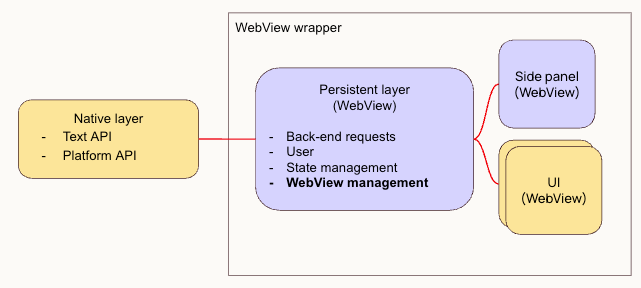
An overview of the native architecture for Superhuman Go using the messaging bus.
That left one key decision: which framework to use for the WebView wrapper and packaging the desktop applications. We evaluated two frameworks: Electron and Tauri. Electron is a popular open-source framework that combines the full Chromium browser and the Node.js runtime into a single package, making it a natural fit for desktop applications built with web technologies. However, Electron is best suited for applications where most user interactions occur within a single primary window. We needed a framework that could create and manage multiple independent UI WebViews in our native app. With these capabilities, Go can annotate content and add context directly in native apps, such as adding suggestion underlines and in-line cards in Notes, Mail, and other apps.
That’s why we chose Tauri, a lightweight, open-source framework with more flexible WebView management, allowing us to create multiple WebViews for all UI elements. As a result, we were able to create a platform that allows our agents to work on native apps and to easily add new agents in the future.
The bottom line
We recently shipped Superhuman Go as a browser extension and as desktop apps for Mac and Windows, capping a journey that started with a simple principle: Invest early in systems that let you write once and run everywhere. For us, this meant building agents by investing in a solution that runs web components across platforms and high-level abstractions like a messaging bus to manage communication layers across all components. As a result, we avoided platform-specific rewrites and kept our codebase clean and portable, even as we scaled.
But launching across all platforms is just the first step—there are more agents to build, more integrations to tackle, and more UX optimizations to make. If that sounds like work you’d like to be part of, we’d love to hear from you. Apply for our open engineering roles.